
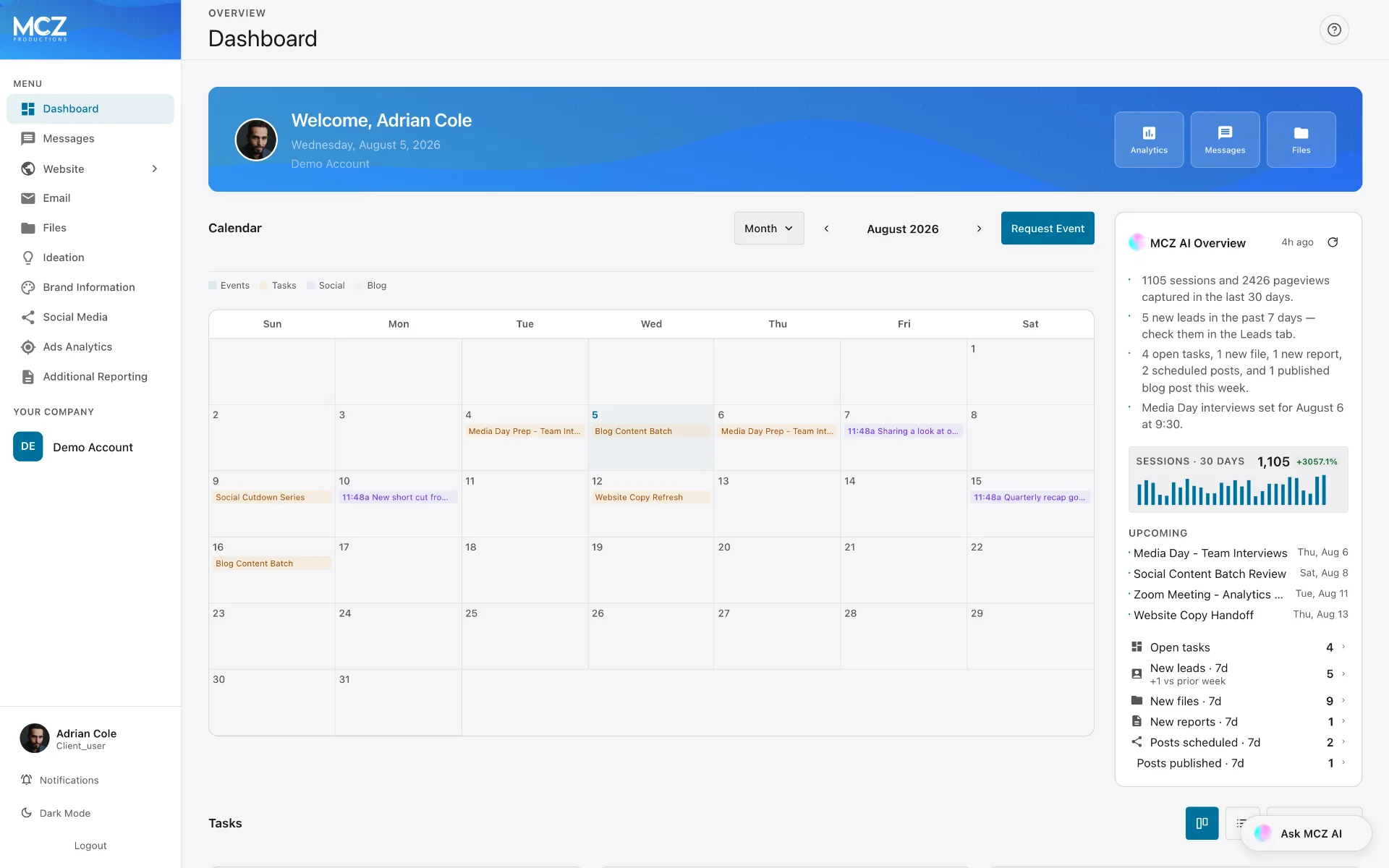
One place to see everything we do for you. Now in beta.
Today we’re introducing the MCZ Client Portal — a single application that brings your deliverables, project schedule, website and campaign performance, content calendar, and your conversation with our team into one view.
Here is what is inside it.
Built around your engagement
Your portal is provisioned around the services you are contracted for, so you see the modules that apply to your account and nothing else. It keeps the interface to what is useful to you, and it expands when your engagement does.
Dashboard
The home screen, and a view of everything in motion.
An AI-written overview summarizes recent activity, traffic, and what is coming up, and refreshes on demand. Three quick-link tiles sit beneath it, and you configure them yourself for the tabs you use most.
The calendar carries shoots, meetings, deadlines, scheduled social posts, and blog publish dates on one grid, in month, week, or day view. Any item can be saved to your phone, Google, or Outlook calendar. Want a media day or a meeting on the books? Submit an event request from the calendar and track its status as we review and confirm it.
Below that is the task board — Pending, In Progress, Completed. Open any task for its description, the person handling it, dates, and an estimate in working days. A log inside each task carries progress updates and photos as the work happens. It is the same board we work from.
Messages
One thread with your team.
Messages is the internal line between you and MCZ — your account team, editors, and strategists, in a single ongoing conversation instead of scattered emails and texts. It is not a customer-facing inbox and nothing here reaches anyone outside the engagement.
Attach files. Search your entire history. And attach a reference to any item in the portal — a file, task, event, blog post, script, report, or social post — so a request points at the exact thing rather than a description of it. Everyone on both sides sees the same conversation.
Files
The shared drive between you and MCZ, split into what we have delivered and what you have sent us.
Preview any file full size. Select several and download them as one archive. Share a file with someone outside the portal using a private link and PIN.
Video review has its own full-screen page. Leave a revision note and it pins to that exact second, showing up as a marker on the video’s progress bar. Attach a reference image or clip to any note, and resolve it when it is handled.
Every video is transcribed automatically, usually within a minute. Search the transcript to jump to the moment a word was said, click any line to seek there, and export it as text or as an .srt caption file. Ask for an AI summary of what the video covers, or generate chapters and tap straight to the section you want.
Website Analytics
Who is visiting your site, and what they do there.
Two sources sit behind this tab, and you can switch between them.
The first is ours, built directly into your site. It is cookieless — better for your compliance position than conventional analytics — and it recognizes a returning visitor as the same person for a full month, longer than a cookie-based system manages. It filters bots, spam, and repeat loads of the same page.
The second is GA4 and Search Console, for the Google view of the same site alongside your search performance.
You get users, sessions, pageviews, average duration, and a live count of who is on the site right now. Then traffic over time, where visitors come from, referring sites, top pages, devices, browsers, and a visitor map. Customer Journeys reconstructs the actual path someone takes through your site, page by page. Core Web Vitals reports how fast your pages load for real visitors. Click a row in most tables and the whole page filters to those visitors.
SEO
Where you stand in search, and what is holding you back.
Site Health scores your site from 0 to 100, with the specific findings behind it broken out by category and available as a full report.
Rank and search data come through Serper. The audit runs on our own system — the checks, their weighting, and how findings get prioritized are ours, built against documentation from Google and other reputable sources.
The Keywords view lists every phrase we track, where you rank, which page ranks for it, and when it was last checked.
Blog Posts
Every article written for your site: draft, scheduled, and published, as a list or on a calendar. Posts here publish to your live website.
The editor works like a word processor. A settings panel holds the featured image, focus keyword, and the title and description Google shows in results — we normally fill these in.
Review a draft and/or revise it yourself if you want to: change a line, adjust a claim, tighten a paragraph. If it is a small change and you would rather not, reference the post in a message and we will make it. Once a post is live, the portal stays in sync with your website, so edits made in either place carry across.
Form Submissions
Every enquiry your forms capture, with the name, contact details, and exactly what was typed.
Search and filter the table, set a status, add a deal value, apply your own tags. Statuses are your pipeline stages and can be renamed to match how you actually sell. Values roll up into active, won, and lost totals over any date range. Export to CSV whenever you want.
Open any lead for every field submitted, the pages that person viewed before submitting, and a notes section for logging calls — status changes record themselves there. We review and clear spam.
For running a full sales process, we typically recommend configuring a dedicated CRM alongside this, and we will help select one and connect it.
UTM Builder
Tagged links, so traffic is attributed to the placement that produced it rather than aggregated into general traffic.
Enter the destination page, the source, the medium, and a campaign name. The builder assembles the tagged link and generates a matching QR code, which can be downloaded as an image for print applications — vehicle wraps, yard signs, business cards, mailers, and trade show material. Scans are recorded as tracked traffic.
The table lists every tracked campaign, including those detected automatically from incoming traffic, with clicks and form submissions per link. Expanding a row shows the QR code, sessions, pageviews, phone and email clicks, and a ninety-day chart. Links can be saved permanently to the table on request.
Email Marketing
Campaign performance reported alongside every other channel. Campaigns are written and sent by our team; the portal is where results are reviewed.
Delivery runs on SMTP2GO, which sustains high deliverability and improves the likelihood that campaigns reach the primary inbox rather than the promotions tab.
Reported metrics are sends, open rate, and click rate, with a live preview of each email as recipients received it and an engagement summary comparing delivered, opened, and clicked volumes over a selected window.
The module covers campaign sends and the reporting behind them. Where an engagement calls for advanced lifecycle automation, we implement that on a dedicated email platform and continue to report performance here.
Brand Information
Information about your brand, kept in one place: logo files, color values, typography, social links, and a documented profile of the market you are going after. It is the reference we build campaigns and assets against, and the AI assistant reads from it so answers arrive in the context of your brand.
Ideation
Where scripts get written — short form and long form.
Each project holds a script editor and a shot list covering scene, shot type, description, duration, and status. Teleprompter mode turns a script into a scrolling prompt you can read to camera from a phone or tablet.
Whether we write your script or you opt to write it yourself, the work happens here.
The AI assistant works directly in here. Tell it to punch up an opening, cut a script to thirty seconds, or restructure a middle that sags, and it applies the edit to the open project.
Social Media
What is planned, what is scheduled, what is live, and how it performed.
Every post carries a status — draft, scheduled, published, or failed — and failed posts get reposted by us. View the planner as a list or a calendar, and open any post to preview its caption, media, and destination platforms.
The analytics view covers audience growth and engagement data across your connected platforms, over seven, thirty, and ninety days, with tables for your top-performing content.
Ads Analytics
If we run paid media for you, campaign performance is reported here — spend, results, and cost per result, broken out by campaign over the window you select.
Setup, budgets, and optimization stay with us.
Additional Reporting
Anything prepared by hand rather than generated automatically: monthly summaries, campaign wrap-ups, strategy documents, custom breakdowns. View them in the portal or download them together.
Ask MCZ AI
An assistant sits on every tab and answers questions about your own account in plain language.
Ask how the site performed last month and it reads your data and answers, instead of pointing you at a chart to interpret. Ask it to show something a particular way and it builds the chart — so you are not limited to the views we happened to design.
It is trained across the work we do, script writing and data analysis included. It can revise a script in place, explain a drop in traffic, or tell you what a metric actually means for your business. And it is grounded in your account, so the answer is about you rather than about marketing in general.
On your phone
The portal is a progressive web app, built for mobile rather than shrunk to fit. Install it to your home screen and it behaves like a native app: review a cut, approve it, reply to a message, check your numbers, from wherever you happen to be. Most of our clients approve video from a phone.
Security
Your account is isolated at the database level, so one client’s data is structurally unable to appear in another’s. Permissions are enforced on our servers rather than hidden in the interface. Credentials and connected accounts are encrypted at rest, and access is scoped per person on your team.
Getting access
The MCZ Client Portal is in beta and available on request to active clients. What we build next is shaped largely by what clients ask for once they are in it.
If you are an MCZ client and want a login, ask your account contact. If you are not and you want to see what working this way looks like, get in touch.
Get MCZ Productions articles in your Google results.